
Example Walkthrough: Moviegoer Experience
This guide uses the example of a moviegoer’s journey to explore how to build a User Needs Map.
The Context: Challenges triggering the session
A team at a cinema ticketing platform, “CineTicket”, is struggling with several issues:
Team misalignment: Different teams manage overlapping responsibilities, leading to duplicated efforts and communication breakdowns.
Slow flow of change: Dependencies between teams cause delays when rolling out new features, like personalised recommendations.
User complaints: Users find it difficult to discover movies that match their preferences, and the ticket booking process feels clunky.
Step 1: Define the purpose
The goal of this User Needs Mapping session is to:
Clarify user needs at each stage of the moviegoer’s journey.
Identify the capabilities required to meet those needs.
Visualise dependencies to inform better team and service boundaries
Step 2: Identify Users
There are many different users who engage with CineTicket’s services — from cinema operations teams and marketing specialists to film distributors and customer support staff.
For this example, we focus on the Moviegoer. The Moviegoer is a core user who interacts with many of the platform’s services, from discovering films through to booking tickets and managing plans. While they are not the only user we should consider, starting with the Moviegoer gives us a clear, outside-in view of how value flows through the system and helps surface misalignment and dependencies that affect everyone else.
Step 3: Define User Needs
Consider our user the “Moviegoer”, CineTicket’s user research team have identified that this user has the following goal:
Enjoy a movie experience that meets my personal preferences in an easy and stress-free way
If we summarise what they are trying to achieve in a simple statement, it might look something like this:
When I want to relax or spend quality time with others, I want to choose, book, and attend a movie that matches my preferences and schedule, so that I feel entertained and confident my plans will go smoothly.
Within this statement, we can identify a few things that they are trying to achieve:
Functional: Choose and watch a movie I like at a convenient time and location.
Emotional: Feel entertained, relaxed, or inspired by the movie.
Emotional: Feel confident that my plans will go smoothly.
Social: Enjoy quality time with friends or family.
Social: Share my experience to connect with others or influence their choices.
When considering the stages that a user might take to achieve their goal, it can be useful to consider them in terms of what the user is trying to get done (a needs view).

Let’s break the moviegoer’s journey into simple, relatable stages:
Discover a movie: The moviegoer wants to find a movie that matches their interests.
Select a showtime: They need to know when and where the movie is playing.
Book tickets: They want to reserve seats and pay securely.
Receive confirmation: They need proof of their booking (e.g., a QR code).
Attend the movie: They need a smooth experience entering the cinema and enjoying pre-booked concessions.
Provide feedback: They want to share their experience or leave a review.
Each of these stages represents a user goal that the system must support through its capabilities.
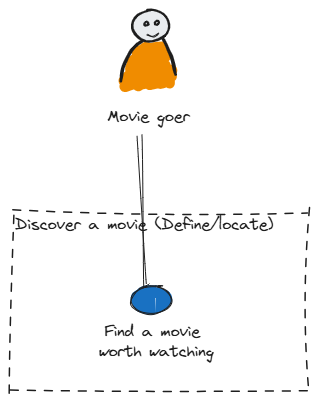
We begin the mapping process with the first step in the moviegoer’s journey:
“Discover a movie.”
User Context
The user is browsing the platform, hoping to find a movie they’ll enjoy.
User Need
“I need to ‘find a movie that matches my interests and schedule’.”
Step 4: Map Capabilities
To meet this user need, we ask: “What capabilities does the system need to provide?”
Capabilities Identified
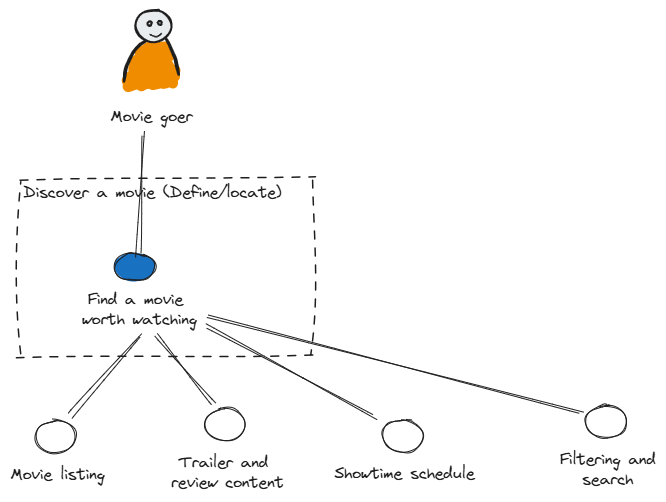
Movie Listings: A database of movies currently showing.
Showtime Schedules: Details about times and locations.
Filtering & Sorting: Tools to help users narrow their search.
Trailers & Reviews: Content that helps users decide if the movie is worth watching.
Recommendations engine: A system to provide recommendations based upon the user’s view habits
CMS: A content management system providing ways to easily manage content
We now map how these capabilities interact to meet the user need.
Value Chain for “Discover a Movie”
Observable Insights
“Recommendations engine” would need to inform the movie listing and trailer content based upon user preferences.
“CMS” is a shared component that would need to be used when managing movie listings and trailer/review content.
Dependencies like this can inform service boundaries or highlight bottlenecks.
There is an implied visibility hierarchy in the value chain. Things that are more “visible” to the user are at the top.
When validating your dependency chain, consider walking through each node and ask your yourself whether it makes sense in a sentence like:
“When a Movie Goer needs to Find a Movie Worth Watching they will depend on a movie listing which will depend on a recommendations engine”
You should be able to “walk the dependency chain” in this fashion and find that it makes logical sense.
Explore the Next User Need
Once we’ve mapped “Discover a movie”, we move to the next step: “Select a showtime.”
Select a Showtime User Need
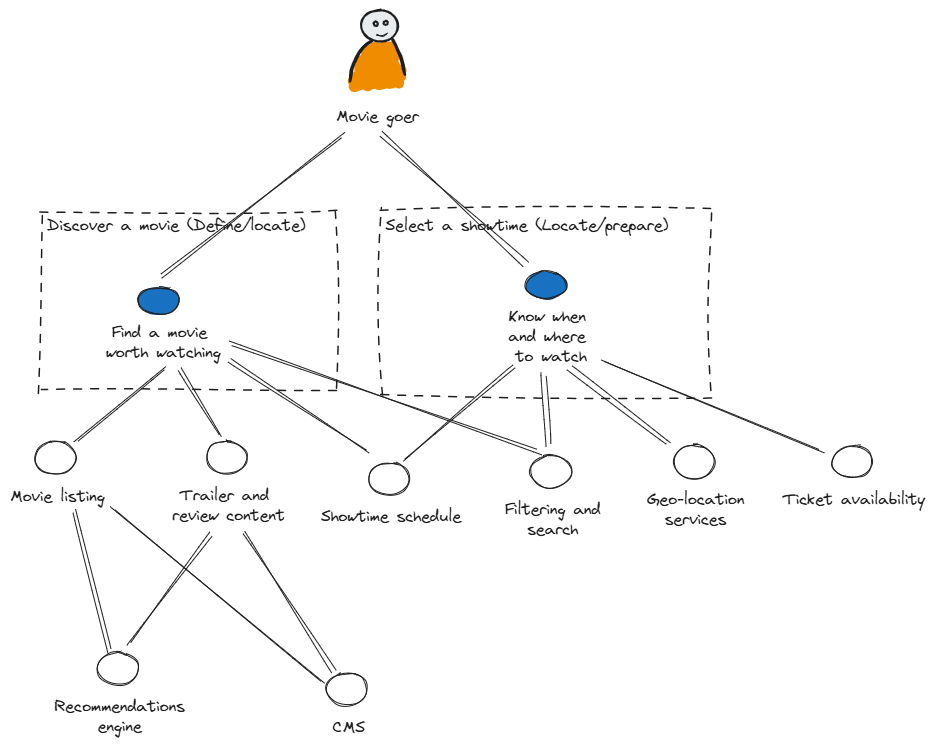
“I need to ‘know when and where I can watch the movie’.”
Observable insights from the value chain
“Geo-Location Services” introduces a new capability that ties into the moviegoer’s physical location.
This insight could lead to the formation of a platform team for location-based services.
Capabilities for “Select a Showtime”
Showtime Schedules: Ties movies to times and locations.
Geo-Location Services: Helps users find nearby cinemas.
Ticket Availability: Provides real-time seat availability.
Iterate Through User Needs
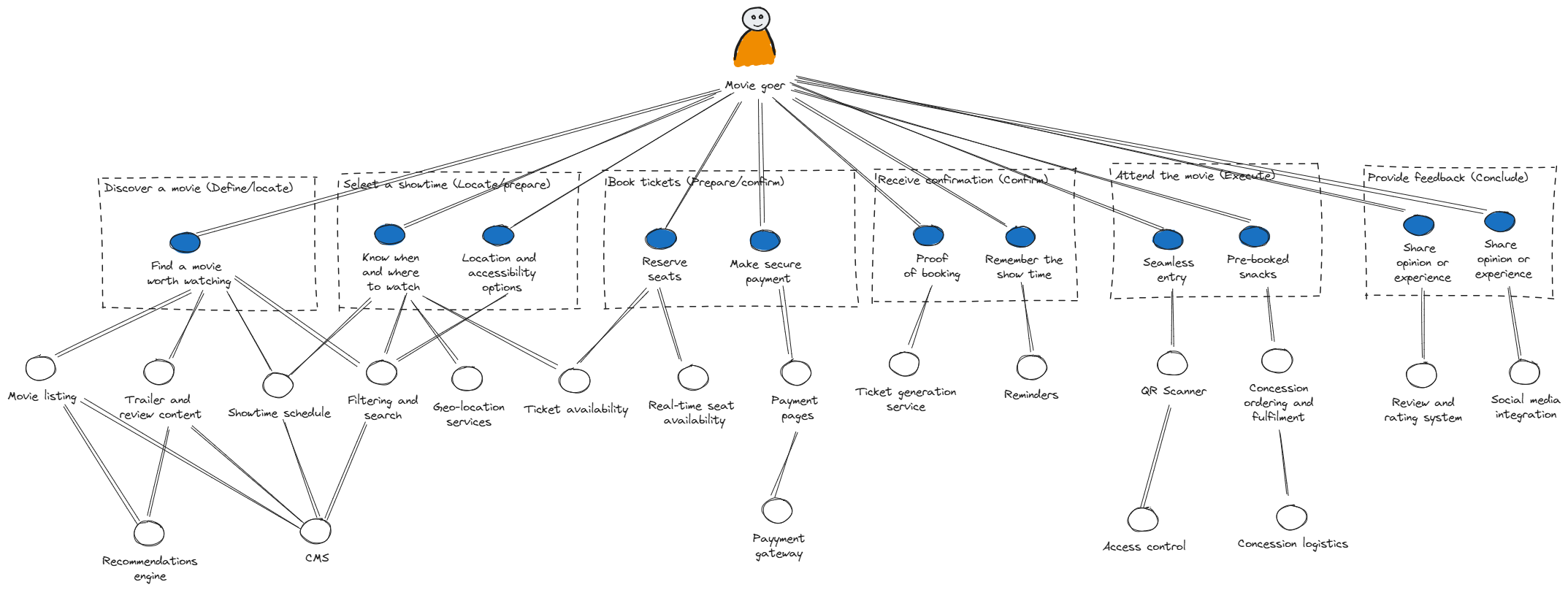
Continue iterating through the user’s journey, mapping needs and capabilities for steps like:
“Book tickets”: Real-time seat availability, payment processing, and ticket generation.
“Receive confirmation”: Notification systems, QR code generation, and email delivery.
“Attend the movie”: Ticket validation and pre-booked concession readiness.
Step 5 & 6: Analyse Dependencies and Propose New Team Boundaries
In this example, we are combining steps 5 & 6 for simplicity, since in this trivial example, we are seeking some potential team boundaries, the analysis and team boundary exploration are essentially combined into a single step.
Once sufficient needs and capabilities are mapped:
Identify cohesive capabilities that are closely related with minimal dependencies.
Consider whether those capabilities might owned by a single team (of 5-9 people) without exceeding their cognitive load.
Visualise the team boundaries by overlaying the relevant Team Topologies team shapes.
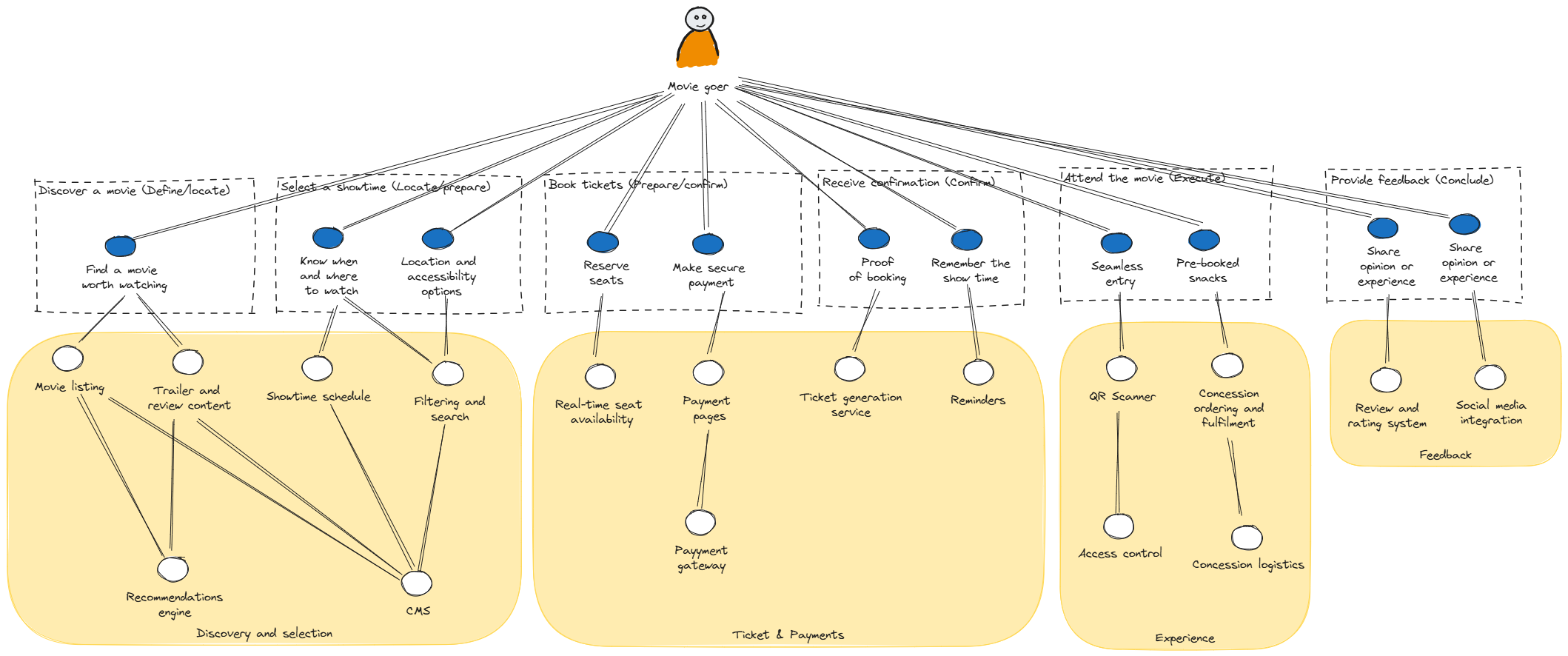
Observable insights from the team overlay
A Discovery and Selection Team might own capabilities related to meeting the needs of Finding a movie worth watching and Know when and where to watch and Location and accessibility options.
A Tickets and Payments Team might manage Booking tickets and Receiving confirmation.
At this point we would have conversations about whether the capabilities could be owned by those teams and if not, how might the boundaries be different. Our first guess will almost definitely be wrong but we can seek to improve that but gaining further insights as we’ll see in the next step.
Step 7: Iterate and Evolve
User Needs Mapping is not a one-time exercise. Over time:
Reassess dependencies as new needs emerge.
Refine team boundaries to optimise for fast flow and reduced cognitive load.
Validate insights with real-world feedback from users and teams.
Revision #1
The next revision might be based upon our initial conversations that identified that teams would not have sufficient cognitive capacity to handle owning each of the capabilities identified. The previously suggested team structure would also introduce duplication of work which could be simplified by introducing platforms that aim to reduce cognitive load and improve flow. This might then result in the following proposed team options.
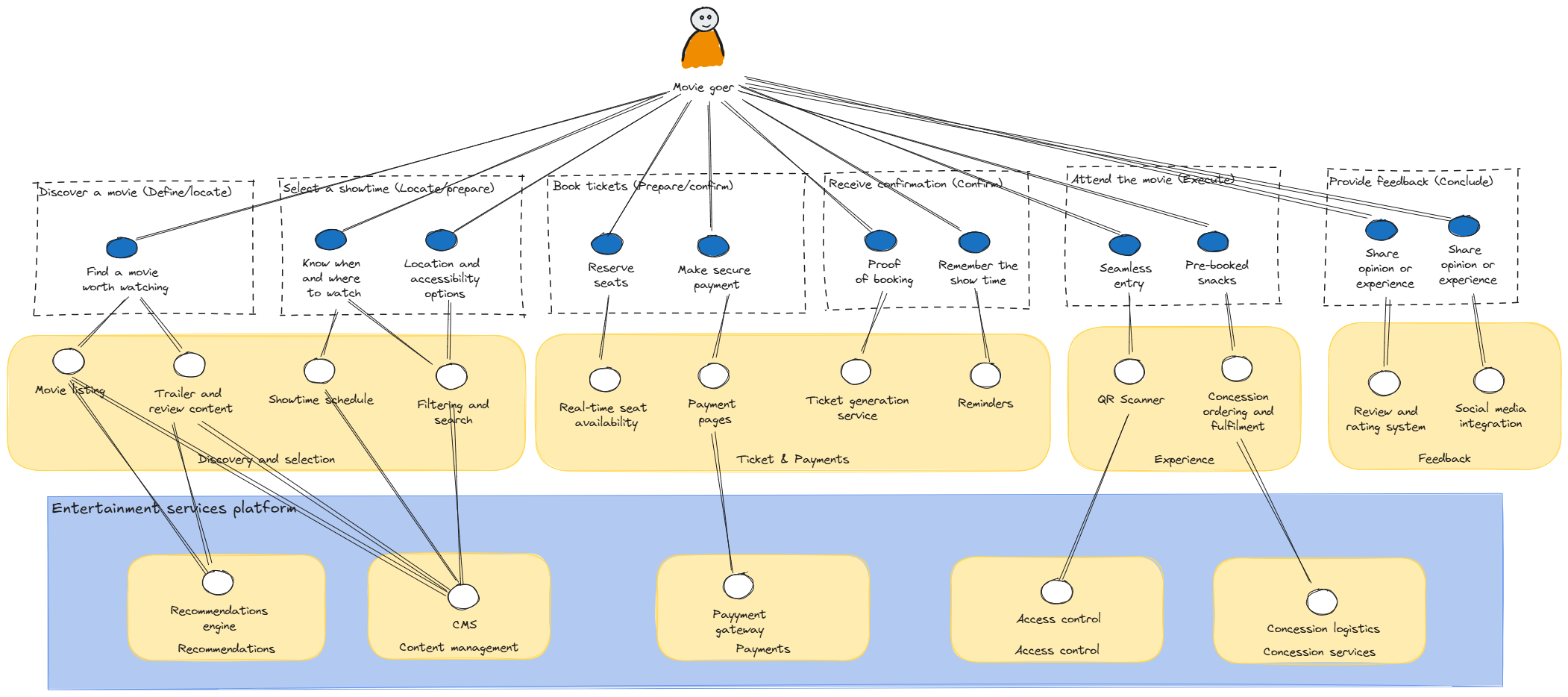
The suggestion would be to introduce an “Entertainment services platform” made up of a number of teams each with their own responsibility for capabilities that would typically be shared by one or more stream-aligned teams or where the cognitive load would be sufficiently high for the consuming team to understand all of the details and therefore it would make sense to abstract some of the capabilities away and enable teams self-serve only what they need.
Revision #2
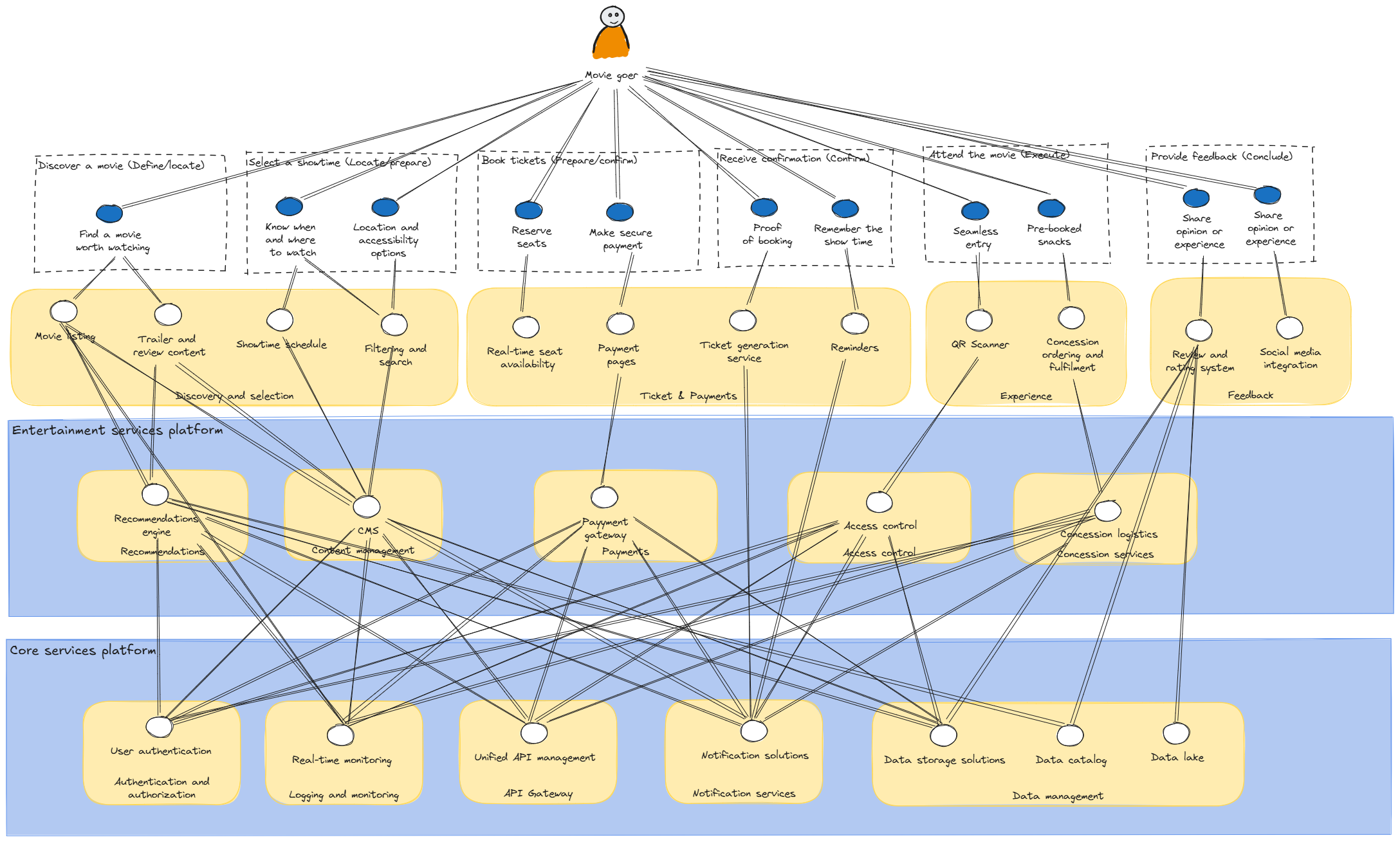
Further conversations might lead on to realise that the platform teams we previously introduced are also dependent on shared capabilities (platforms need platforms too!) and it would actually make sense to define further platforms to support them.
Further revisions would then be completed as and when necessary to continuously evolve the organisation. This might include adding further users with different needs to help uncover where we have unknown or invisible dependencies that might be causing challenges to the flow of value within the organisation.
Conclusion
This simplified example of the mapping process is intended to give you an idea of what is involved. It does not provide an exhaustive list of all potential insights an organisation could uncover by following this process.
Ultimately, a User Needs Map can help to:
Clarify how user needs are met through capabilities.
Highlight critical dependencies and bottlenecks.
Guide better team and service boundary design.
Start with the first step of your user’s journey, just as we did with “Discover a movie.” Iterate until you’ve mapped enough needs and capabilities to gain actionable insights for your organisation.